- Latest
- Trending

For reference, a new Add Widgets panel was said to be added to the Camera app in iOS 27. It would basically allow you to add and remove features, which would be labeled as widgets, to the interface. Both photo and video modes would have their own set of widgets and would be categorized between the Basic, Manual, and Settings sections based on their usage.
For instance, you will find the Flash widget under the Basic section. You would then simply need to tap on it to add it to your main camera interface. All the added widgets will then appear at the top of the UI.
It’s not that the feature wasn’t announced but was added directly to the first iOS 27 beta, which is already available to download. My colleagues who have installed the beta confirmed that the Camera app interface is similar to what it was in iOS 26. I guess the company would most likely announce this upgrade sometime later and make it available with the iOS 27.1 or 27.2 beta release.
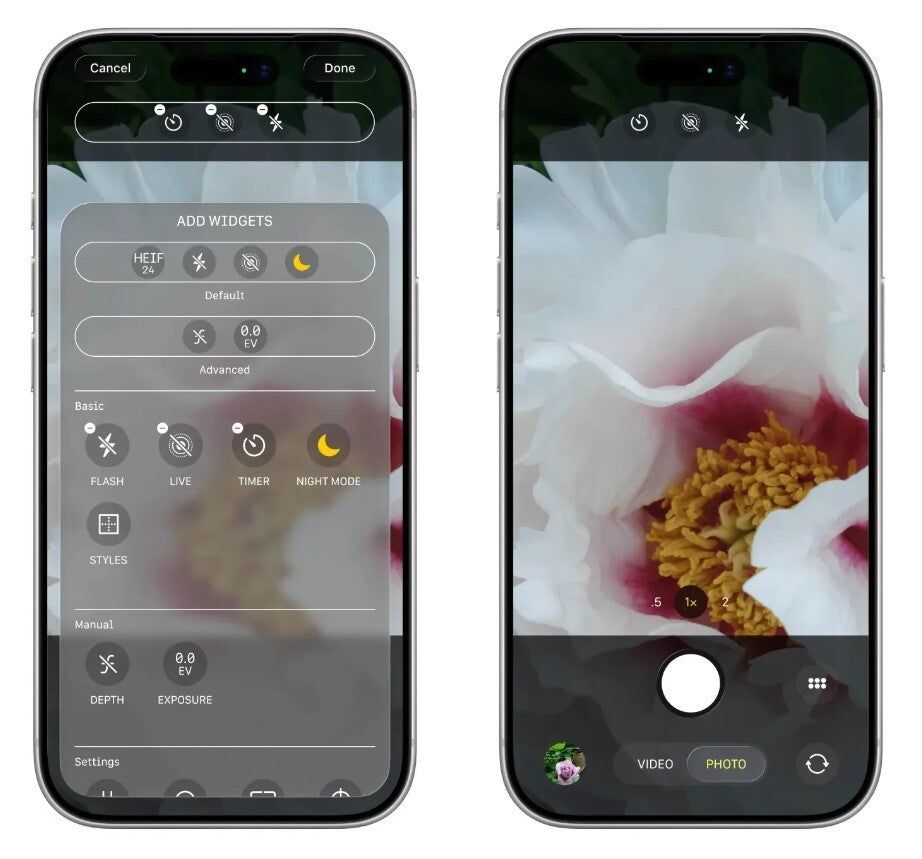
Add Widgets feature in Camera app. | Image by Bloomberg
While there weren’t any signs of the highly anticipated Add Widgets feature, Apple did announce that iOS 27 will add a new Siri mode in the Camera app. It will be available alongside the photo and video modes that you already have with iOS 26. However, unlike the other two modes, its camera shutter logo looks like the logo of Apple Intelligence.
Similarly, the Visual Intelligence capabilities of this mode will allow you to instantly add a phone number and address to the Contacts app by simply scanning the information mentioned on a business card. It’s also worth noting that with the latest update, the Camera Control button will continue to allow you to access Visual Intelligence, but going through this approach now will open the Siri mode in the Camera app instead of taking you to the standalone Visual Intelligence experience you have with iOS 26.
The Photos app has also received two important features that you would definitely love if you are into photo editing. The first one is Extend, while the other one has been named Reframe.
Before switching to the Pixel 10 last year, I used the iPhone 15 as my daily driver. I still have the iPhone SE 2020 with the iOS 26 update installed. I have personally felt that the camera interface of the iPhone is very basic.
It’s not that the required option is not there, but some are present inside the app, while others are hidden deep in the Camera app settings. But with the Add Widgets feature, Apple is finally addressing this shortcoming. Once it becomes available on my second‑generation SE, I’ll add the filters and exposure widgets to the top of the camera interface.

Brittany Barreto, Ph.D., is a podcaster, an entrepreneur, and a molecular and human geneticist. (In other words, she’s really smart.)...

A spyware firm has been targeting WhatsApp users with malicious links in contravention of a US court order forbidding it...
In November, a little-known American tech company announced a $115 million agreement to buy a little-known Dutch tech company.Deals like...
Discover Global News Panorama at news.mapworldnow.com — your universal gateway to comprehensive, international journalism. From politics and technology to culture and sports, we cover all news niches and all news categories from every corner of the world, all in one place.